👉 Change Detection Strategy
By default Angular uses the ChangeDetectionStrategy.Default change detection strategy. The default strategy doesn’t assume anything about the application anything from a click event to data received from an ajax call causes the change detection to be triggered.
@Component({
  template: `
    <h1>Hello {{name}}!</h1>
    {{runChangeDetection}}
  `
})
export class HelloComponent {
  @Input() name: string;

  get runChangeDetection() {
    console.log('Checking the view');
    return true;
  }
}
@Component({
  template: `
    <hello></hello>
    <button (click)="onClick()">Trigger change detection</button>
  `
})
export class AppComponent  {
  onClick() {}
}
This technique is called dirty checking. In order to know whether the view should be updated, Angular needs to access the new value, compare it with the old one, and make the decision on whether the view should be updated.
Now, imagine a big application with thousands of expressions; If we let Angular check every single one of them when a change detection cycle runs, we might encounter a performance problem.
Although Angular is very fast, as your app grows, Angular will have to work harder to keep track of all the changes.
What if we could help Angular and give it a better indication of when to check our components?
🔥 OnPush Change Detection Strategy
We can set the ChangeDetectionStrategy of our component to ChangeDetectionStrategy.OnPush .
This tells Angular that the component only depends on its @inputs() ( aka pure ) and needs to be checked only in the following cases:
1️⃣ The Input reference changes.
By setting the onPush change detection strategy we are signing a contract with Angular that obliges us to work with immutable objects (or observables as we’ll see later).
The advantage of working with immutability in the context of change detection is that Angular could perform a simple reference check in order to know if the view should be checked. Such checks are way cheaper than a deep comparison check.
Let’s try to mutate an object and see the result.
@Component({
  selector: 'tooltip',
  template: `
    <h1>{{config.position}}</h1>
    {{runChangeDetection}}
  `,
  changeDetection: ChangeDetectionStrategy.OnPush
})
export class TooltipComponent  {

  @Input() config;

  get runChangeDetection() {
    console.log('Checking the view');
    return true;
  }
}
@Component({
  template: `
    <tooltip [config]="config"></tooltip>
  `
})
export class AppComponent  {
  config = {
    position: 'top'
  };

  onClick() {
    this.config.position = 'bottom';
  }
}
When we click on the button we will not see any log. That’s because Angular is comparing the old value with the new value by reference, something like:
/** Returns false in our case */
if( oldValue !== newValue ) {
  runChangeDetection();
}
Just a reminder that numbers, booleans, strings, null and undefined are primitive types. All primitive types are passed by value. Objects, arrays, and functions are also passed by value, but the value is a copy of a reference.
So in order to trigger a change detection in our component, we need to change the object reference.
@Component({
  template: `
    <tooltip [config]="config"></tooltip>
  `
})
export class AppComponent  {
  config = {
    position: 'top'
  };

  onClick() {
    this.config = {
      position: 'bottom'
    }
  }
}
With this change we will see that the view has been checked and the new value is displayed as expected.
2️⃣ An event originated from the component or one of its children.
A component could have an internal state that’s updated when an event is triggered from the component or one of his children.
For example:
@Component({
  template: `
    <button (click)="add()">Add</button>
    {{count}}
  `,
  changeDetection: ChangeDetectionStrategy.OnPush
})
export class CounterComponent {
  count = 0;

  add() {
    this.count++;
  }

}
When we click on the button, Angular runs a change detection cycle and the view is updated as expected.
You might be thinking to yourself that this should work with every asynchronous API that triggers change detection, as we learned at the beginning, but it won’t.
It turns out that the rule applies only to DOM events, so the following APIs will not work.
Note that you are still updating the property so in the next change detection cycle, for example, when we click on the button, the value will be six ( 5 + 1 ).
@Component({
  template: `...`,
  changeDetection: ChangeDetectionStrategy.OnPush
})
export class CounterComponent {
  count = 0;

  constructor() {
    setTimeout(() => this.count = 5, 0);

    setInterval(() => this.count = 5, 100);

    Promise.resolve().then(() => this.count = 5);

    this.http.get('https://count.com').subscribe(res => {
      this.count = res;
    });
  }

  add() {
    this.count++;
  }

}
3️⃣ We run change detection explicitly.
Angular provides us with three methods for triggering change detection ourselves when needed.
The first is detectChanges() which tells Angular to run change detection on the component and his children.
@Component({
  selector: 'counter',
  template: `{{count}}`,
  changeDetection: ChangeDetectionStrategy.OnPush
})
export class CounterComponent {
  count = 0;

  constructor(private cdr: ChangeDetectorRef) {

    setTimeout(() => {
      this.count = 5;
      this.cdr.detectChanges();
    }, 1000);

  }

}
The second is ApplicationRef.tick() which tells Angular to run change detection for the whole application.
tick() {

  try {
    this._views.forEach((view) => view.detectChanges());
    ...
  } catch (e) {
    ...
  }
}
The third is markForCheck() which does NOT trigger change detection. Instead, it marks all onPush ancestors as to be checked once, either as part of the current or next change detection cycle.
Another important thing to note here is that running change detection manually is not considered a “hack”, this is by design and it’s completely valid behavior (in reasonable cases, of course).
markForCheck(): void {
  markParentViewsForCheck(this._view);
}

export function markParentViewsForCheck(view: ViewData) {
  let currView: ViewData|null = view;
  while (currView) {
    if (currView.def.flags & ViewFlags.OnPush) {
      currView.state |= ViewState.ChecksEnabled;
    }
    currView = currView.viewContainerParent || currView.parent;
  }
}
🤓 Angular Async Pipe
The async pipe subscribes to an observable or promise and returns the latest value it has emitted.
Let’s see a trivial example of an onPush component with an input() observable.
@Component({
  template: `
    <button (click)="add()">Add</button>
    <app-list [items$]="items$"></app-list>
  `
})
export class AppComponent {
  items = [];
  items$ = new BehaviorSubject(this.items);

  add() {
    this.items.push({ title: Math.random() })
    this.items$.next(this.items);
  }
}
Component({
  template: `
     <div *ngFor="let item of items">{{item.title}}</div>
  `,
  changeDetection: ChangeDetectionStrategy.OnPush
})
export class ListComponent implements OnInit {
  @Input() items: Observable<Item>;
  _items: Item[];

  ngOnInit() {
    this.items.subscribe(items => {
      this._items = items;
    });
  }

}
When we click on the button we are not going to see the view updated. This is because none of the conditions mentioned above occurred, so Angular will not check the component at the current change detection cycle.
Now, let’s change it to use the async pipe.
@Component({
  template: `
    <div *ngFor="let item of items | async">{{item.title}}</div>
  `,
  changeDetection: ChangeDetectionStrategy.OnPush
})
export class ListComponent implements OnInit {
  @Input() items;
}
Now we can see that the view is updated when we click on the button. The reason for that is that when a new value is emitted, the async pipe marks the component to be checked for changes. We can see it in the source code:
private _updateLatestValue(async: any, value: Object): void {
  if (async === this._obj) {
    this._latestValue = value;
    this._ref.markForCheck();
  }
}
Angular is calling to markForCheck() for us and that’s why the view is updated even though the reference hasn’t changed.
If a component depends only on its input properties, and they are observable, then this component can change if and only if one of its input properties emits an event.
Quick tip: It’s an anti-pattern to expose your subject to the outside world, always expose the observable, by using the asObservable() method.
👀 onPush and View Queries
Let’s say we have the following components:
Probably your expectation is that after three seconds Angular will update the tab component view with the new content.
After all, we saw that if we update the input reference in onPush components this should trigger change detection, no?
Unfortunately, in this case, it doesn’t work that way. There is no way for Angular to know that we are updating a property in the tab component. Defining inputs() in the template is the only way to let Angular knows that this property should be checked on a change detection cycle.
For example:
@Component({
  selector: 'app-tabs',
  template: `<ng-content></ng-content>`
})
export class TabsComponent implements OnInit {
  @ContentChild(TabComponent) tab: TabComponent;

  ngAfterContentInit() {
    setTimeout(() => {
      this.tab.content = 'Content';
    }, 3000);
  }
}
@Component({
  selector: 'app-tab',
  template: `{{content}}`,
  changeDetection: ChangeDetectionStrategy.OnPush
})
export class TabComponent {
  @Input() content;
}
<app-tabs>
  <app-tab></app-tab>
</app-tabs>
Because we define explicitly the input() in the template, Angular creates a function called an updateRenderer(), that keeps track of the content value during each change detection cycle.
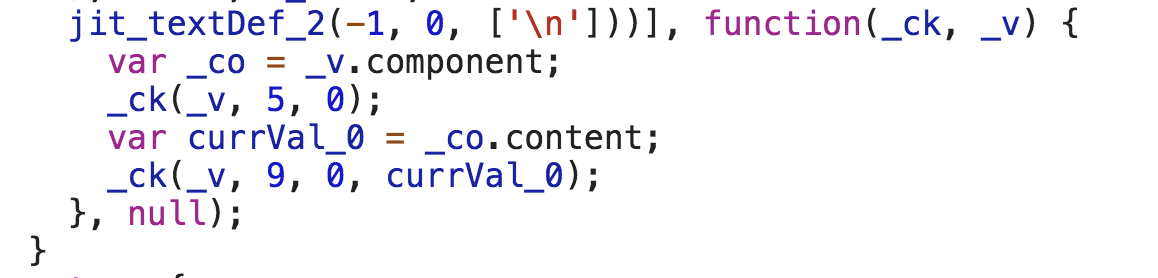
The simple solution in these cases is to use setters and call markForCheck().
@Component({
  selector: 'app-tab',
  template: `
    {{_content}}
  `,
  changeDetection: ChangeDetectionStrategy.OnPush
})
export class TabComponent {
  _content;

  @Input() set content(value) {
    this._content = value;
    this.cdr.markForCheck();
  }

  constructor(private cdr: ChangeDetectorRef) {}

}
<app-tabs>
  <app-tab [content]="content"></app-tab>
</app-tabs>
💪 === onPush++
After we understood (hopefully) the power of onPush, we can leverage it in order to create a more performant application. The more onPush components we have the less checks Angular needs to perform. Let’s see a real world example:
Let’s say that we have a todos component that takes a todos as input().
Create a todo component and define its change detection strategy to be onPush. For example:
@Component({
  selector: 'app-todos',
  template: `
    <app-todo [todo]="todo" *ngFor="let todo of todos"></app-todo>
  `,
  changeDetection: ChangeDetectionStrategy.OnPush
})
export class TodosComponent {
  @Input() todos;
}

@Component({
  selector: 'app-todo',
  template: `{{todo.title}} {{runChangeDetection}}`,
  changeDetection: ChangeDetectionStrategy.OnPush
})
export class TodoComponent {
  @Input() todo;

  get runChangeDetection() {
    console.log('TodoComponent - Checking the view');
    return true;
  }

}
Now when we click the add button we’ll see a single log in the console because none of the inputs of the other todo components changed, therefore their view wasn’t checked.
Also, by creating a dedicated component we make our code more readable and reusable.
 Anthony Ku Ong