In this example you will learn how to map one-to-many relationship using Hibernate. Consider the following relationship between Student and Phone entity.
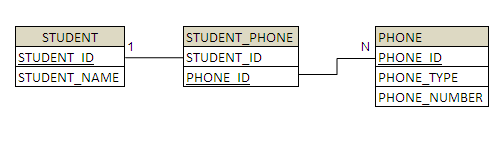
According to the relationship a student can have any number of phone numbers. The relational model is shown below.

To create this relationship you need to have a STUDENT, PHONE and STUDENT_PHONE table. To do this you will need to properly create the Object-to-Relational mapping .
The *.hbml xml file can be created to map the persistence objects to the relational database, or we can simply use hibernate annotations
to be used in the persistent class code. The example below will use the hibernate annotation @OneToMany to achieve this.
We use many-to-many element to create the one-to-many relationship between the Student and Phone entities. Since a student can have any number of phone numbers we use a collection to hold the values. In this case we use Set. Many-to-many element is usually used to create many-to-many relationship, here we place the unique constraint on the PHONE_ID column, this makes the relationship one-to-many
package org.anthonykuong.dto;

import javax.persistence.Entity;
import javax.persistence.GeneratedValue;
import javax.persistence.Id;
import javax.persistence.OneToMany;

@Entity
public class Phone implements java.io.Serializable {
	@Id @GeneratedValue
	private long phoneId;
	private String phoneType;
	private String phoneNumber;

	public Phone() {
	}

	public Phone(String phoneType, String phoneNumber) {
		this.phoneType = phoneType;
		this.phoneNumber = phoneNumber;
	}

	public long getPhoneId() {
		return this.phoneId;
	}

	public void setPhoneId(long phoneId) {
		this.phoneId = phoneId;
	}

	public String getPhoneType() {
		return this.phoneType;
	}

	public void setPhoneType(String phoneType) {
		this.phoneType = phoneType;
	}

	public String getPhoneNumber() {
		return this.phoneNumber;
	}

	public void setPhoneNumber(String phoneNumber) {
		this.phoneNumber = phoneNumber;
	}

}
package org.anthonykuong.dto;

import java.util.HashSet;
import java.util.Set;

import javax.persistence.Entity;
import javax.persistence.GeneratedValue;
import javax.persistence.Id;
import javax.persistence.OneToMany;

/**
 * This class contains student details.
 */

@Entity
public class Student implements java.io.Serializable {
	@Id @GeneratedValue
	private long studentId;
	private String studentName;
	@OneToMany
	private Set studentPhoneNumbers = new HashSet(0);

	public Student() {
	}

	public Student(String studentName) {
		this.studentName = studentName;
	}

	public Student(String studentName, Set studentPhoneNumbers) {
		this.studentName = studentName;
		this.studentPhoneNumbers = studentPhoneNumbers;
	}

	public long getStudentId() {
		return this.studentId;
	}

	public void setStudentId(long studentId) {
		this.studentId = studentId;
	}

	public String getStudentName() {
		return this.studentName;
	}

	public void setStudentName(String studentName) {
		this.studentName = studentName;
	}

	public Set getStudentPhoneNumbers() {
		return this.studentPhoneNumbers;
	}

	public void setStudentPhoneNumbers(Set studentPhoneNumbers) {
		this.studentPhoneNumbers = studentPhoneNumbers;
	}

}
Please pay careful attention in your hibernate.cfg.xml (alternatively you can use hibernate.properties) that you
remember to use the mapping class xml attribute definition for the one to many relationship definition between
the One to Many relationship between Student and Phone.
<?xml version='1.0' encoding='utf-8'?>
<!DOCTYPE hibernate-configuration PUBLIC
        "-//Hibernate/Hibernate Configuration DTD 3.0//EN"
        "http://hibernate.sourceforge.net/hibernate-configuration-3.0.dtd">

<hibernate-configuration>
    <session-factory>
        <property name="hibernate.connection.driver_class">org.h2.Driver</property>
        <property name="hibernate.connection.url">jdbc:h2:tcp://localhost/~/test;DB_CLOSE_DELAY=-1;MVCC=TRUE</property>
        <property name="hibernate.connection.username">sa</property>
        <property name="hibernate.connection.password"></property>

        <!-- JDBC connection pool (use the built-in) -->
        <property name="connection.pool_size">1</property>

        <property name="hibernate.dialect">org.hibernate.dialect.H2Dialect</property>

        <!-- Enable Hibernate's automatic session context management -->
        <property name="current_session_context_class">thread</property>

        <!-- Disable the second-level cache  -->
        <property name="cache.provider_class">org.hibernate.cache.NoCacheProvider</property>

        <!-- Echo all executed SQL to stdout -->
        <property name="show_sql">true</property>

        <!--  Drop and re-create the database schema on startup -->
        <property name="hbm2ddl.auto" >create</property>

        <!--  Names the annotated entity class -->
        <!--  One to Many Example -->
        <mapping class="org.anthonykuong.dto.Phone" />
        <mapping class="org.anthonykuong.dto.Student" />

    </session-factory>
</hibernate-configuration>
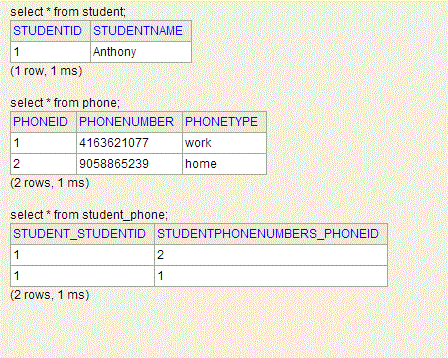
Lastly, here is a stub test class that will insert one student named Anthony with a home and work number.
Hibernate will create the mapping table student_home
package org.anthonykuong.hibernate;

import java.util.HashSet;
import java.util.Set;

import org.anthonykuong.dto.Phone;
import org.anthonykuong.dto.Student;
import org.anthonykuong.dto.Timesheet;
import org.anthonykuong.dto.UserDetails;
import org.hibernate.Session;
import org.hibernate.SessionFactory;
import org.hibernate.cfg.Configuration;

public class OneToManyHibernateTest {
	public static void main (String [] args){
		Student stud1 = new Student();
		stud1.setStudentName("Anthony");
		Phone phone_anthony_work = new Phone();
		phone_anthony_work.setPhoneType("work");
		phone_anthony_work.setPhoneNumber("4163621077");
		Phone phone_anthony_home = new Phone();
		phone_anthony_home.setPhoneType("home");
		phone_anthony_home.setPhoneNumber("9058865239");
		Set studentPhoneNumbers = new HashSet();
		studentPhoneNumbers.add(phone_anthony_work);
		studentPhoneNumbers.add(phone_anthony_home);
		stud1.setStudentPhoneNumbers(studentPhoneNumbers);
		//Normally if this is a service method , you would create a data layer using a custom DAO
		// but since we are using hibernate, this is done automatically through the hibernate persistence api
		//1. Create a session factory from the configuration file.
		//2. Create a Session out of the Session Factory
		//3. Once you have a session, user the session to save the objects.
		SessionFactory sessionFactory = new Configuration().configure().buildSessionFactory();
		Session session = sessionFactory.openSession();
		session.beginTransaction();
		session.save(phone_anthony_work);
		session.save(phone_anthony_home);
		session.save(stud1);
		session.getTransaction().commit();

	}
}
Alternatively, you many not like this approach because a third mapping table might not be desired. You may want to instead have
the stduent_id relationship available in the Phone table instead. How can this be achieved? Use the mappedBy attribute
provided by hibernate. MappedBy basically signals hibernate that the key for the relationship is on the other side. This means that although you link 2 tables together, only 1 of those tables has a foreign key constraint to the other one. MappedBy allows you to still link from the table not containing the constraint to the other table, making this possible.
Let’s do that by adding a column referenced in the Phone’s entity that we want to do the mapping for. In this case it will be the student member variable
in the Phone entity that contains a Many-To-One relationship with the Student entity..
package org.anthonykuong.dto;

import java.util.HashSet;
import java.util.Set;

import javax.persistence.Entity;
import javax.persistence.GeneratedValue;
import javax.persistence.Id;
import javax.persistence.OneToMany;

/**
 * This class contains student details.
 */

@Entity
public class Student implements java.io.Serializable {
	@Id @GeneratedValue
	private long studentId;
	private String studentName;
	@OneToMany (mappedBy="student")

	private Set<Phone> studentPhoneNumbers = new HashSet<Phone>(0);

	public Student() {
	}

	public Student(String studentName) {
		this.studentName = studentName;
	}

	public Student(String studentName, Set<Phone> studentPhoneNumbers) {
		this.studentName = studentName;
		this.studentPhoneNumbers = studentPhoneNumbers;
	}

	public long getStudentId() {
		return this.studentId;
	}

	public void setStudentId(long studentId) {
		this.studentId = studentId;
	}

	public String getStudentName() {
		return this.studentName;
	}

	public void setStudentName(String studentName) {
		this.studentName = studentName;
	}

	public Set<Phone> getStudentPhoneNumbers() {
		return this.studentPhoneNumbers;
	}

	public void setStudentPhoneNumbers(Set<Phone> studentPhoneNumbers) {
		this.studentPhoneNumbers = studentPhoneNumbers;
	}

}
Lastly we need to add @JoinColumn in the Phone entity , and the foreign key name from the Student table. In our case we will call it STUDENT_ID.
package org.anthonykuong.dto;

import javax.persistence.Entity;
import javax.persistence.GeneratedValue;
import javax.persistence.Id;
import javax.persistence.JoinColumn;
import javax.persistence.ManyToOne;
import javax.persistence.OneToMany;

@Entity
public class Phone implements java.io.Serializable {
	@Id @GeneratedValue
	private long phoneId;
	private String phoneType;
	private String phoneNumber;
	@ManyToOne
	@JoinColumn(name="STUDENT_ID")
	private Student student;
	public Phone() {
	}

	public Phone(String phoneType, String phoneNumber) {
		this.phoneType = phoneType;
		this.phoneNumber = phoneNumber;
	}

	public long getPhoneId() {
		return this.phoneId;
	}

	public void setPhoneId(long phoneId) {
		this.phoneId = phoneId;
	}

	public String getPhoneType() {
		return this.phoneType;
	}

	public void setPhoneType(String phoneType) {
		this.phoneType = phoneType;
	}

	public String getPhoneNumber() {
		return this.phoneNumber;
	}

	public void setPhoneNumber(String phoneNumber) {
		this.phoneNumber = phoneNumber;
	}

	public void setStudent(Student student) {
		this.student = student;
	}

	public Student getStudent() {
		return student;
	}

}
 Anthony Ku Ong